A sheet never reminds you
Your Google Sheets tracker sits in a tab until you remember to open it. Deadlines and follow-ups slip past because nothing nudges you when a date is close.

Tracking applications in a Google Sheets tracker and tired of the manual upkeep? MyApplio is the Google Sheets job tracker alternative that imports your existing sheet in a few clicks, then captures jobs for you and reminds you before deadlines slip, no formulas to maintain.
Bring your sheet
Export your Google Sheets tracker to CSV, paste the rows into our import template, and import them, so you switch without losing your applications.
Stop retyping
One-click capture fills company, role, location, and link from any posting, instead of copying cells across browser tabs.
It reminds you
Deadlines and follow-ups surface on their own, the part a spreadsheet can never do for you.
From the maker
MyApplio is built by one developer who is still job hunting too. The core stays free; Supporter helps keep the workspace running and improving.
Why people switch from a spreadsheet
A spreadsheet is free and flexible, and that counts for a lot. The cost shows up later, in the manual upkeep, the missed follow-ups, and the analytics you never had time to build.
Your Google Sheets tracker sits in a tab until you remember to open it. Deadlines and follow-ups slip past because nothing nudges you when a date is close.
A spreadsheet is free and flexible, but you copy company, role, location, and link into cells by hand for every posting. The Chrome extension does it for you in one click.
Response rate, interview rate, and pipeline only appear in a sheet if you build and maintain the formulas yourself. Most trackers never get that far.
Side by side
Both keep your applications in one place. The difference is how much of the work you do by hand.
| Feature | MyApplio | Google Sheets |
|---|---|---|
| Auto-fill job details from a posting | Yes | Manual typing |
| Import your existing sheet | Yes | It is the sheet |
| Reminders and deadline alerts | Yes | None |
| Built-in analytics without formulas | Yes | DIY formulas |
| Attach resume and cover letter to each row | Yes | Links to folders |
| Status views (kanban, table, cards) | Yes | DIY setup |
| Keeps working on mobile | Yes | Cramped cells |
| Free tier | Yes | Free |
Comparison based on publicly available information as of June 2026. Google Sheets is a trademark of Google LLC and is not affiliated with MyApplio.
What you get instead
Import what you already built, then let one-click capture, reminders, and analytics do the parts a spreadsheet leaves to you.
Paste your existing Excel or CSV rows into the import template, or let AI reformat them, then bulk import them as tracked applications, with company, role, status, and link preserved.
The Chrome extension fills company, role, location, and link from any LinkedIn, Indeed, or company careers posting in a single click.
Notifications and a Needs Attention view surface deadlines and follow-ups before they slip past you.
Response rate, interview rate, and pipeline by status are calculated for you, with no formulas to write or maintain.
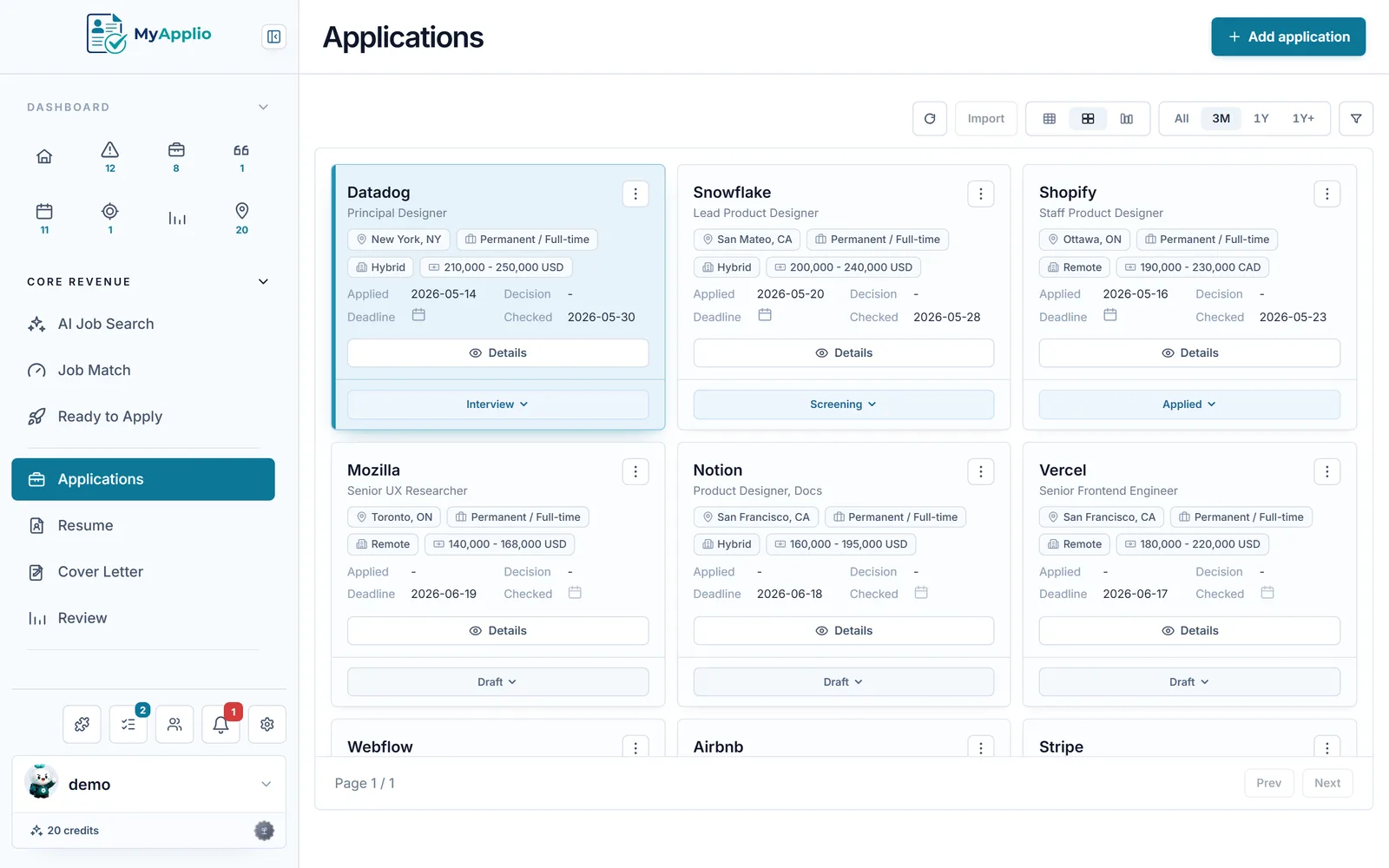
View the same applications as a sortable table, a card grid, or a kanban board grouped by status, whichever fits how you think.
Attach the exact resume and cover letter you sent to each application, instead of hunting through folders linked from a cell.
How the switch works
Sign in with Google, no credit card. Export your Google Sheets tracker to CSV, paste the rows into our import template, and import them as tracked applications, so you keep your data.
Install the Chrome extension and click it on any posting to fill company, role, location, and link, instead of typing each one into a new spreadsheet row.
Move applications across statuses in a table, card grid, or kanban board, and let reminders and built-in analytics show you what needs attention next.
An honest trade
Common questions
Yes. Export your Google Sheets job tracker to Excel or CSV, paste the rows into our import template (or let AI reformat them to fit), and bulk import them, up to 100 rows at a time, as tracked applications. Company, role, status, and link are preserved, so you switch without retyping anything and keep the work you already did.
A spreadsheet is free and flexible, and that is genuinely useful. The tradeoff is manual upkeep: you type every posting in by hand, build your own formulas for any analytics, and nothing reminds you when a deadline or follow-up is due. MyApplio keeps the same data but captures jobs in one click, reminds you automatically, and calculates response rate and pipeline for you.
Yes. Sign in with Google and you are on the Free plan immediately, with no credit card. You can import your spreadsheet, track applications, attach resumes and cover letters, and get reminders for free. Upgrade only if you want unlimited AI actions like resume rewrites and cover letter drafts.
It fills itself in with one-click capture from the Chrome extension, reminds you about deadlines and follow-ups in a Needs Attention view, calculates response rate and pipeline without any formulas, attaches the exact resume and cover letter to each application, and shows your search as a kanban board, table, or card grid. A spreadsheet job tracker alternative should remove the manual upkeep, not just copy the columns.
No. Every application is a structured record you can sort, filter, and group by company, role, status, location, date, salary, or link, the same way you slice a sheet. You gain reminders, attachments, and analytics on top, while keeping your data fully in your control.
Your applications, imported rows, resumes, and notes are protected by row-level access controls, so only you can see them. Public resume sharing is opt-in per resume, and search indexing is off by default.
Get started
Free to start. Import your Google Sheets tracker, or install the Chrome extension and capture your next job in one click.