
How to Track Job Applications Without Losing Your Mind
A simple system for tracking every job you apply to: what to record, which statuses to use, and how to never miss a deadline or follow-up.
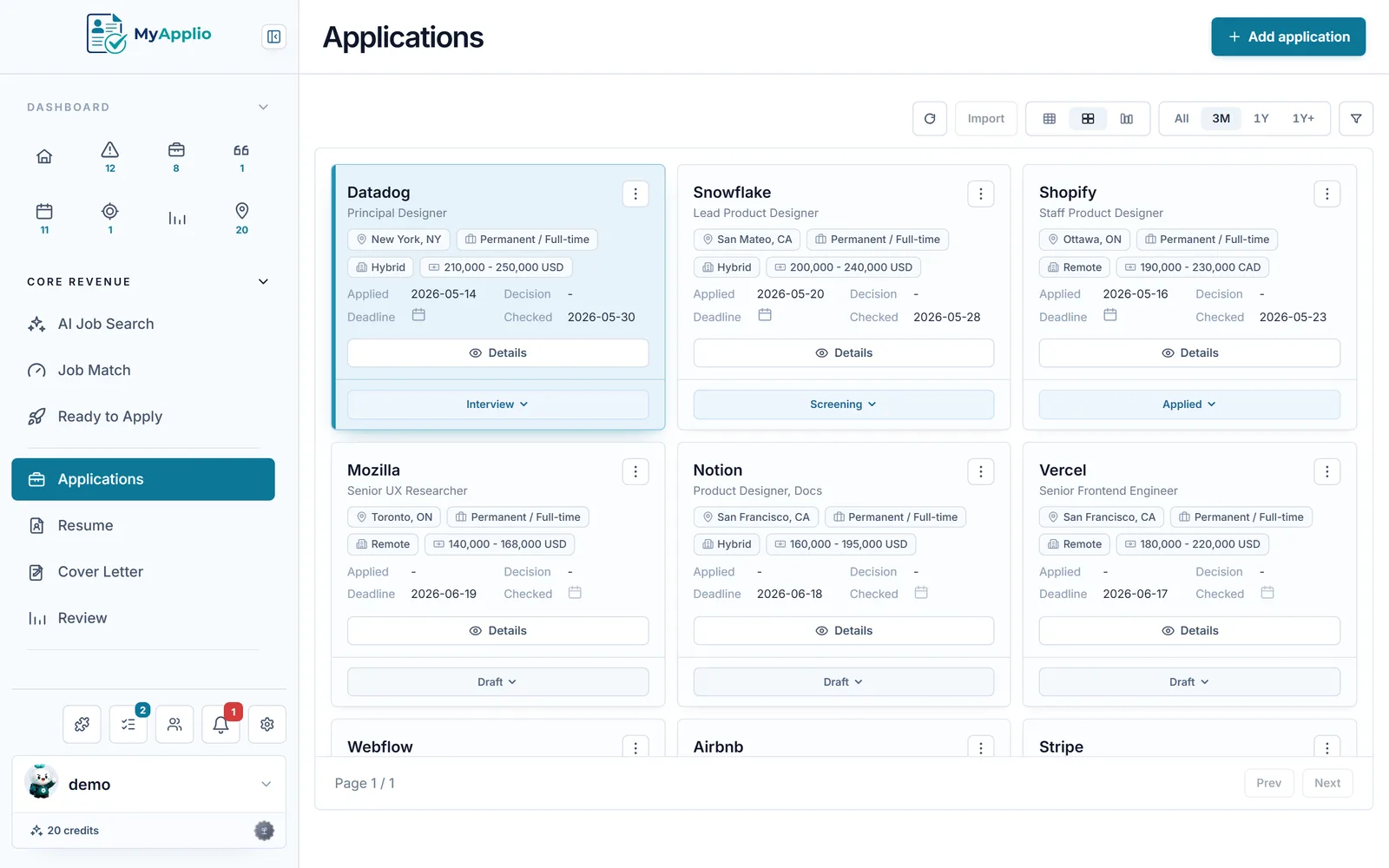
A real job search moves fast. You find a posting on Monday, apply on Tuesday, get a recruiter email on Friday, and by the following week you genuinely cannot remember whether you already heard back from that company or confused it with a different one. The fix is not more willpower, it is a system. When you track job applications in one consistent place, you stop relying on memory and start making decisions from facts: which roles are still live, which ones need a nudge, and where your time is actually paying off.
Why a job application tracker matters
The average active job seeker applies to dozens of roles across multiple sites. Each one generates small pieces of information that arrive at unpredictable times: a confirmation email, a recruiter message, an interview invite, a take-home assignment. Without a single record, that information scatters across your inbox, your browser tabs, and your head. A job application tracker pulls it back together so you can answer three questions in seconds: What did I apply to? What is the current status? What do I need to do next? That clarity reduces anxiety and, more practically, it stops you from missing follow-ups and deadlines that quietly decide whether you advance.
Exactly what to record per application
The trap most people fall into is recording too little (just a company name) or too much (every email pasted in full). Aim for the fields you will actually act on. For each application, capture the following:
- Company: the employer name, plus a note if it is through an agency or recruiter.
- Role: the exact job title, since one company may post several similar ones.
- Link: the URL of the posting. Save a copy of the description too, because listings get taken down.
- Date applied: the day you submitted, which anchors your follow-up timing.
- Status: where this role sits in your pipeline (more on this below).
- Contact: the recruiter or hiring manager name and email, if you have one.
- Deadline: any application cutoff, assessment due date, or interview time.
- Salary: the posted range or your expectation, so you can compare offers honestly.
- Notes: which resume version you sent, referral source, and anything the recruiter mentioned.
That is enough to reconstruct the full story of any application without drowning in detail. If a field is consistently empty, drop it. The goal is a record you will keep up to date, not a perfect one you abandon.
Choosing a status system that fits your pipeline
Status is the single most valuable field, because it lets you sort your whole search at a glance. Keep the set small and unambiguous. A reliable default looks like this:
- Saved: a role you found and want to apply to but have not yet.
- Applied: submitted, waiting to hear back.
- Screening: a recruiter call or initial review is underway.
- Interview: you are in one or more interview rounds.
- Offer: an offer is on the table.
- Rejected: closed out, by them or by you.
Six stages cover almost every search. Resist the urge to add a status for every micro-step, because the more statuses you have, the less you trust any of them. If you need more nuance, put it in the notes field rather than inventing a new column. A clean status list is what turns a pile of applications into a pipeline you can manage.
Where to keep your tracker: spreadsheet vs app
You have two honest options, and both are valid. A spreadsheet is free, instantly available, and endlessly flexible. If you are applying to a handful of roles, a single sheet with the columns above will serve you well, and you can start with a free template rather than building one from scratch. The downside is that a spreadsheet never reminds you of anything. It will not tell you that a follow-up is overdue or that a deadline is tomorrow, and capturing a posting means copying fields by hand.
A dedicated tool trades some flexibility for memory and speed. Using a job application tracker means you can save a posting in one click, see follow-up reminders, and filter by status without maintaining formulas. For a high-volume search, that automation usually pays for itself in roles you would otherwise let slip. Neither choice is wrong. Pick the one you will keep updated every day, because a tracker you ignore helps no one.
Building a follow-up cadence
Tracking is only half the value. The other half is acting on what the tracker shows you, and that means a deliberate follow-up rhythm. A cadence that works for most people:
- Day of applying: log the application immediately, while the details are fresh.
- About one week after applying: if you have a contact and have heard nothing, send a short, polite follow-up.
- After every interview: send a thank-you note within a day and record what was discussed.
- Weekly review: scan everything in Applied or Screening, clear out dead leads, and decide your next moves.
The weekly review is the habit that holds the whole system together. Fifteen minutes once a week to update statuses and spot stalled applications will catch far more opportunities than checking your inbox in a panic.
Common mistakes to avoid
A few patterns quietly sink otherwise good searches. Watch for these:
- Logging late: if you wait until the weekend to record a week of applications, you will forget details and skip some entirely.
- Relying only on email: your inbox is a feed, not a system. It buries the one message that needed a reply.
- Over-engineering: twelve statuses and twenty columns look thorough but become a chore you avoid.
- Not saving the posting: when a listing is removed, you lose the description you needed to prep for the interview.
- Never reviewing: a tracker you only write to and never read is just a diary. The value is in the regular look back.
A quick-start checklist
If you want to set this up today, work through this short list:
- Pick your home: a spreadsheet or a dedicated tracker.
- Create the core fields: company, role, link, date applied, status, contact, deadline, salary, notes.
- Adopt the six-stage status system and do not add more yet.
- Log every application the moment you submit it.
- Set one weekly review slot to update statuses and follow up.
- Save each job description so it survives the posting going down.
None of this requires special discipline once it becomes a habit. The point of a tracking system is to take the remembering off your shoulders so you can spend your energy on the parts of the search that genuinely move the needle: tailoring your application, preparing for interviews, and following up at the right moment. Start small, keep the system lean, and update it the same day you apply. Do that, and you will always know exactly where you stand.
Put this into practice for free.
Capture jobs in one click, tailor your documents, and track every application in one workspace.