
The Best Way to Organize Your Job Search
A practical, end-to-end system for organizing a job search: capture, tailor, track, and follow up, so nothing slips and you can see what is working.
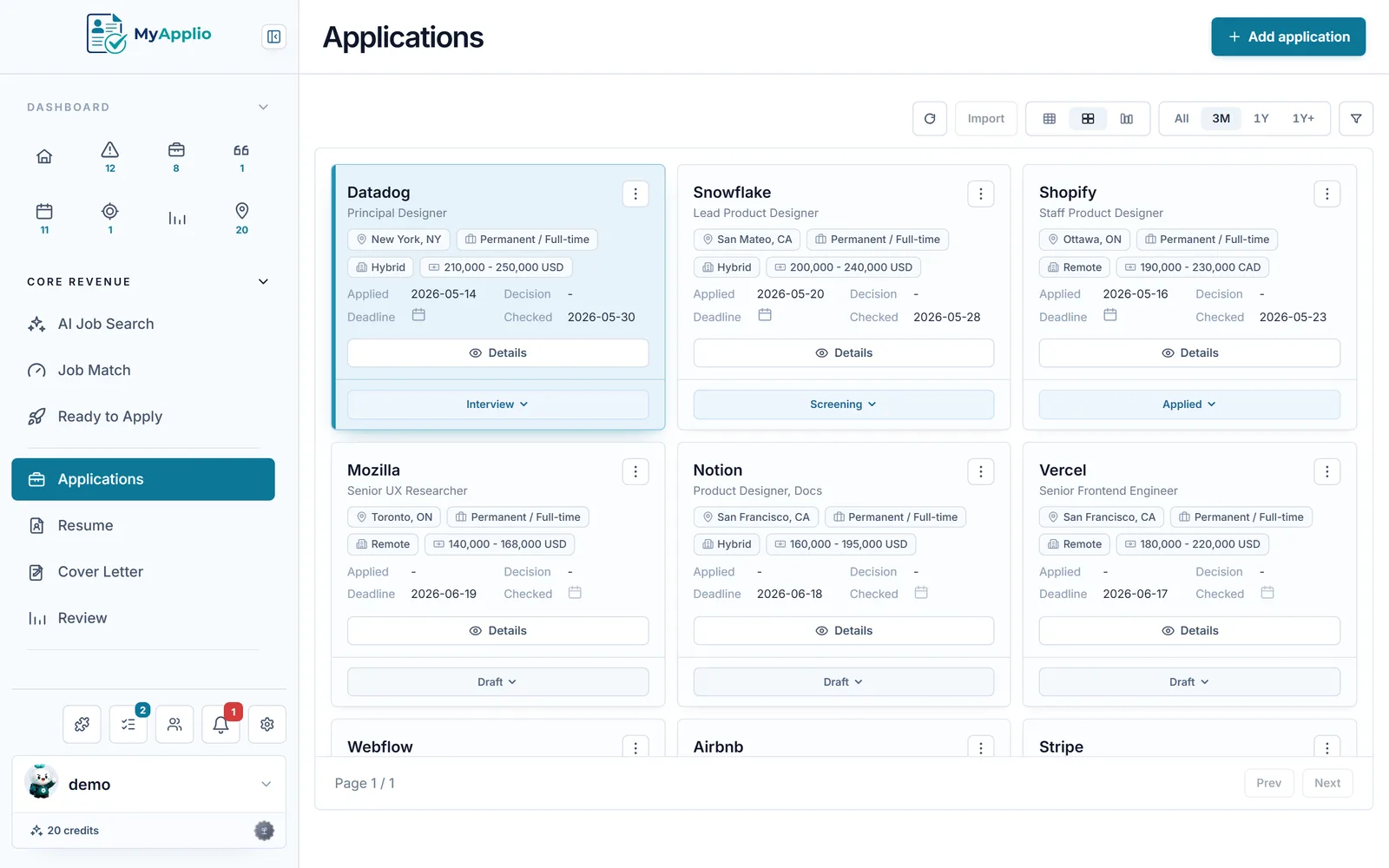
A job search gets messy fast. You open a dozen tabs, save a few links in a notes app, send out a handful of applications, and within two weeks you cannot remember which roles you applied to, which still need a cover letter, or who promised to get back to you. The fix is not more effort. It is a system. When you organize your job search around a few clear stages, every role moves through the same path, and nothing falls through the cracks.
This guide lays out a practical, end-to-end system built on four stages: capture, tailor, track, and follow up. After the stages, we cover how to set the whole thing up once, a light weekly routine to keep it running, and a short list of metrics that tell you whether your search is actually working.
Why a system beats willpower
Most people treat job searching as a pile of one-off tasks. That works for the first five applications and breaks down by the twentieth. The problem is that a search has too many small, time-sensitive details to hold in your head: deadlines, follow-up dates, which resume version you sent, who referred you. A system moves those details out of memory and into a place you can trust. Once the structure exists, each new role is just the same few steps repeated, so the search feels calm instead of chaotic.
The four stages below are not rigid. They are a default path. Some roles will skip a step, and that is fine. What matters is that every role has a known place to live and a clear next action.
Stage 1: Capture every role in one place
The first stage is finding roles and saving them before they disappear. Job posts get taken down, and the description you skimmed on Monday is the one you need for your cover letter on Thursday. Capture means pulling the role into your system the moment you find it, with enough detail to act on later.
For each role, save at least:
- Company and job title, so you can tell similar roles apart.
- The link and the full job description, copied as text in case the post is removed.
- Where you found it and any deadline, so urgent roles do not sit untouched.
The goal of this stage is speed. If saving a role takes more than a minute, you will skip it when you are busy, and the busy days are exactly when good roles appear. Keep one inbox for new finds and process them later rather than tailoring on the spot.
Stage 2: Tailor your resume and cover letter
A captured role is not an application yet. Before you apply, you tailor your documents to match what the posting actually asks for. Tailoring does not mean rewriting everything. It means reading the job description, finding the few requirements that matter most, and making sure your resume speaks to them clearly near the top.
A quick, repeatable tailoring pass looks like this:
- Pull the five or six keywords and responsibilities the posting repeats or emphasizes.
- Adjust your summary and the bullets on your most relevant roles to mirror that language honestly.
- Write a short cover letter that connects one or two real accomplishments to the role.
Working from a strong base document makes this fast. Using a resume builder lets you keep one master resume and spin off a tailored version per role without starting from a blank page each time. Save each tailored version with the role so you know exactly what you sent if you reach the interview.
Stage 3: Track statuses, deadlines, and your pipeline
Once you apply, the role enters your pipeline, and tracking is what keeps the whole search honest. Tracking answers three questions at a glance: what stage is each role in, what needs to happen next, and what is due soon. Without it, active roles quietly go stale while you chase new ones.
Keep your statuses simple. A short list beats a clever one because you will actually update it. Something like Saved, Applied, Interviewing, Offer, and Closed covers almost every situation. Each role sits in exactly one status, and moving it is the signal that something changed.
This is where a dedicated tool earns its place. A spreadsheet can hold the data, but it will not remind you of a deadline or surface the roles that have gone quiet. Using a job application tracker gives you a pipeline view, status columns, and deadline tracking in one place, so you can see your entire search at a glance instead of reconstructing it from memory. Whatever you use, the rule is the same: every role has a status, and every active role has a next action with a date.
Stage 4: Follow up and manage your contacts
Applications rarely move on their own. The fourth stage is following up and keeping track of the people involved. A polite, well-timed follow-up a week or so after applying, or after an interview, keeps you visible without being pushy. The trick is that these threads are easy to forget precisely because they happen later, after the excitement of applying has faded.
To keep follow-ups from slipping:
- Set a reminder the moment you apply or finish an interview, so the next touch is already scheduled.
- Record who you talked to, their role, and how to reach them, so a referral or recruiter contact is never lost.
- Note what was said and what you promised, so your follow-up message can reference something specific.
Contacts compound over a search. The recruiter from a role that did not work out may have a better fit next month, and a thoughtful follow-up is what keeps that door open.
Set up your system once
The four stages only work if you build the structure before you need it. Spend thirty minutes up front so the busy days are easy. Decide where captured roles will live, write down your short status list, prepare your master resume, and pick how you will set reminders. The aim is to make the right action the easy action. When saving a role, tailoring a resume, and setting a follow-up each take a minute, you will keep doing them even when you are tired.
Resist the urge to over-engineer. Extra columns, color codes, and elaborate tags feel productive but mostly create work you will abandon. A system you actually maintain beats a perfect one you do not.
A simple weekly routine
A system needs a heartbeat. A short weekly review keeps everything current and turns a pile of tasks into a steady rhythm. Once a week, sit down for fifteen or twenty minutes and do four things:
- Process your inbox. Tailor and apply to the captured roles worth pursuing, and drop the ones that no longer fit.
- Update statuses. Move each active role to where it really stands and clear out anything that is closed.
- Handle follow-ups. Send the messages that are due and schedule the next ones.
- Plan the week. Decide roughly how many new applications you want to send and where you will look.
This single habit is what separates a search that builds momentum from one that stalls. Everything else is just feeding this loop.
Metrics worth watching
Once your search is running, a few honest numbers tell you whether to keep going or change something. You do not need a dashboard. You need three figures you can glance at:
- Response rate. The share of applications that get any reply. A very low rate usually points to fit or resume problems before it points to the market.
- Interview rate. The share of applications that turn into an interview. This is the clearest signal that your tailoring and targeting are working.
- Applications per week. Your actual output, which keeps you honest about effort versus results.
Read these together. Plenty of applications with no responses means fix your documents or your targeting. Strong responses but few applications means simply do more. The numbers turn guesswork into a decision.
Conclusion
The best way to organize your job search is not a single trick. It is a loop you can trust: capture roles so none are lost, tailor your documents so each application is sharp, track every role so you always know the next step, and follow up so good leads do not go cold. Set the structure up once, keep it alive with a short weekly review, and watch a few honest metrics. Do that, and the search stops feeling like chaos and starts feeling like a process you control.
Put this into practice for free.
Capture jobs in one click, tailor your documents, and track every application in one workspace.